# Android Clash 图文教程
1、已经安装了Clash for Android客户端的安卓本设备浏览器登录进入个人中心\
在仪表盘页面或我的订阅页面找到“一键订阅”按钮,点击并选择“导入到Clash for Android”选项\
2、后会自动提示跳转到Clash for Android客户端。
### 无法自动跳转如果系统无法自动跳转
**一键订阅则可点击“一键订阅”按钮的“复制订阅地址”选项**
并在稍后填入到Clash for Android客户端中进行手动下载。

4、点击 \[从URL导入] 配置文件。\

5、粘贴刚刚复制的订阅链接在URL中,名称可随意填写,自动更新时间推荐720分钟,然后右上角保存。\

6、保存好订阅链接后回到配置文件列表,单击选中配置文件使其生效。 回到主界面,\[点击启动] 即可开始代理。\

7、从主界面进入\[配置] 界面后,右上角菜单可选择代理模式等信息。
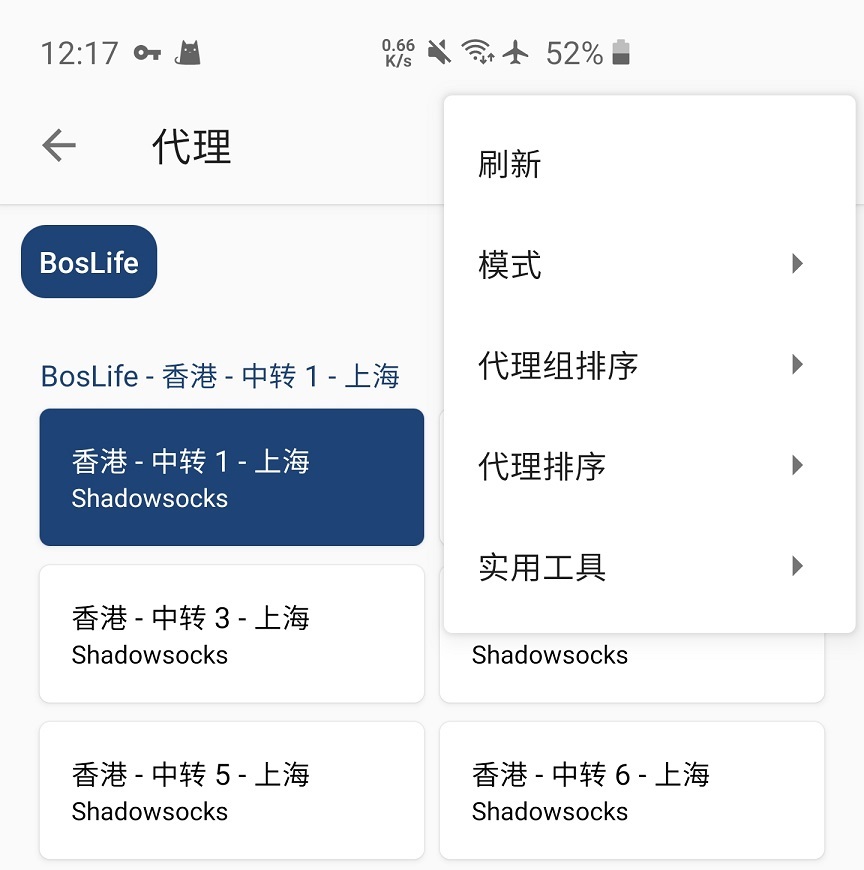
其中: 规则 模式是根据默认规则列表进行代理。 直连 模式是所有连接不通过代理。 全局 模式下所有连接全部通过代理。

---
# Agent Instructions: Querying This Documentation
If you need additional information that is not directly available in this page, you can query the documentation dynamically by asking a question.
Perform an HTTP GET request on the current page URL with the `ask` query parameter:
```
GET https://docs.cloudl.vip/shi-yong-jiao-cheng/android/android-clash-tu-wen-jiao-cheng.md?ask=
```
The question should be specific, self-contained, and written in natural language.
The response will contain a direct answer to the question and relevant excerpts and sources from the documentation.
Use this mechanism when the answer is not explicitly present in the current page, you need clarification or additional context, or you want to retrieve related documentation sections.